Event Execution Order
Udon and Unity have built-in events that are automatically called if you include them in your scripts. For example, the Start() event runs once for every script, and the Update() event runs once per frame. When you're writing Udon scripts, it's helpful to know which of these events happen first.
Unity provides an (incomplete) list of built-in events, many of which are also available in VRChat.
Diagram
The following diagram shows the execution order of the most important events available in Udon and Unity.
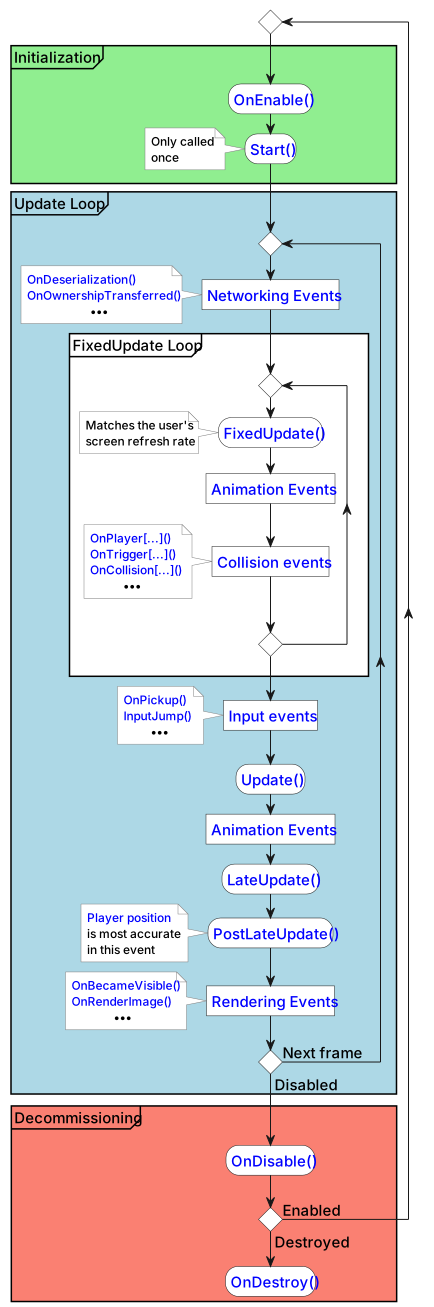
Unity and VRChat updates may change the event execution order depicted above. Not all events are listed, and some events may be executed in a different order depending on circumstances (being an object's owner, joining a world late, etc.)
Unity events available in Udon
Udon forwards most of Unity's MonoBehaviour messages to your scripts. The full list is below, grouped by what they relate to.
Lifecycle
Start, Update, FixedUpdate, LateUpdate, OnEnable, OnDisable, OnDestroy
Physics
OnCollisionEnter, OnCollisionExit, OnCollisionStay, OnTriggerEnter, OnTriggerExit, OnTriggerStay, OnControllerColliderHit, OnJointBreak, OnParticleCollision, OnParticleTrigger
Physics 2D
OnCollisionEnter2D, OnCollisionExit2D, OnCollisionStay2D, OnTriggerEnter2D, OnTriggerExit2D, OnTriggerStay2D, OnJointBreak2D
Mouse
OnMouseDown, OnMouseDrag, OnMouseEnter, OnMouseExit, OnMouseOver, OnMouseUp, OnMouseUpAsButton
Rendering
OnBecameVisible, OnBecameInvisible, OnPreCull, OnPreRender, OnPostRender, OnRenderObject, OnRenderImage, OnWillRenderObject
Animation and audio
OnAnimatorIK, OnAnimatorMove, OnAudioFilterRead
Transform
OnTransformChildrenChanged, OnTransformParentChanged
Editor only
OnDrawGizmos, OnDrawGizmosSelected, OnValidate
These three only run in the Unity Editor, including ClientSim. Unity never sends them in a built player, so they never fire in VRChat itself.
Awake and Reset are not forwarded to Udon. If you write them, they compile without error and are silently never called. Use Start instead of Awake.
Players and drones don't trigger the Unity events
For these eight events, a player or drone touching your collider fires a different event, and the Unity event does not run at all:
OnTriggerEnter, OnTriggerExit, OnTriggerStay, OnCollisionEnter, OnCollisionExit, OnCollisionStay, OnParticleCollision, OnControllerColliderHit
To detect players, use the OnPlayer... versions of these events instead: OnPlayerTriggerEnter, OnPlayerCollisionEnter, and so on. See Player Collisions for the full list. Drones have their own OnDrone... equivalents.
PostLateUpdate
PostLateUpdate is a VRChat event rather than a Unity one, and it runs at the very end of the frame, after every LateUpdate in the scene. It's the best place to read positions that other systems have already moved this frame.
Avatar IK solves during LateUpdate, so by the time PostLateUpdate runs, bones and tracking targets have reached their final positions for the frame. Read player bone and tracking positions here to get the current frame's pose. Read them earlier and you may get the pose from before IK ran. This is also the right place to move an object that must follow a player's hand or head without lagging a frame behind.
public override void PostLateUpdate()
{
    // Runs last in the frame.
}
Unlike the Unity events above, PostLateUpdate is declared on UdonSharpBehaviour, so it needs public override.
Unity events such as Start and OnTriggerEnter don't need to be public. They're ordinary methods, so declare them however you like, and private is fine.
VRChat events such as Interact, OnPlayerJoined and PostLateUpdate are different: they're declared on UdonSharpBehaviour, so C# requires you to write public override when you implement them.