Avatar Quality Guidelines
This page outlines some common quality issues that VRChat avatars can exhibit, and how to avoid them. It's not a complete list, and an avatar with these issues isn't automatically 'low-quality'.
Many creators run into these issues, especially if they're new to VRChat avatar creation. Gaining familiarity with VRChat and the Software Development Kit (SDK), and gathering user feedback, will help you understand how to improve and what matters most.
When you evaluate your own avatar, look at it the way other users will: worn in VRChat, in motion, and from various angles. You can build and test your avatar locally before uploading it.
Topology & edge flow
Topology is the way your avatar's polygons are arranged, and edge flow is the direction its edges follow across the surface. Your avatar's topology affects most of the topics listed below. It determines how well your avatar deforms, how cleanly it shades, and how easily you can create a UV map for its textures.
Meshes that come straight out of sculpting, scanning, generation, or heavy decimation (automatically reducing the polygon count) sometimes have chaotic topology: Triangles of wildly different sizes, no edge loops around joints, and a surface that looks faceted or lumpy under lighting. These meshes usually need to be retopologized - rebuilt with a cleaner polygon layout - before they're ready for VRChat.
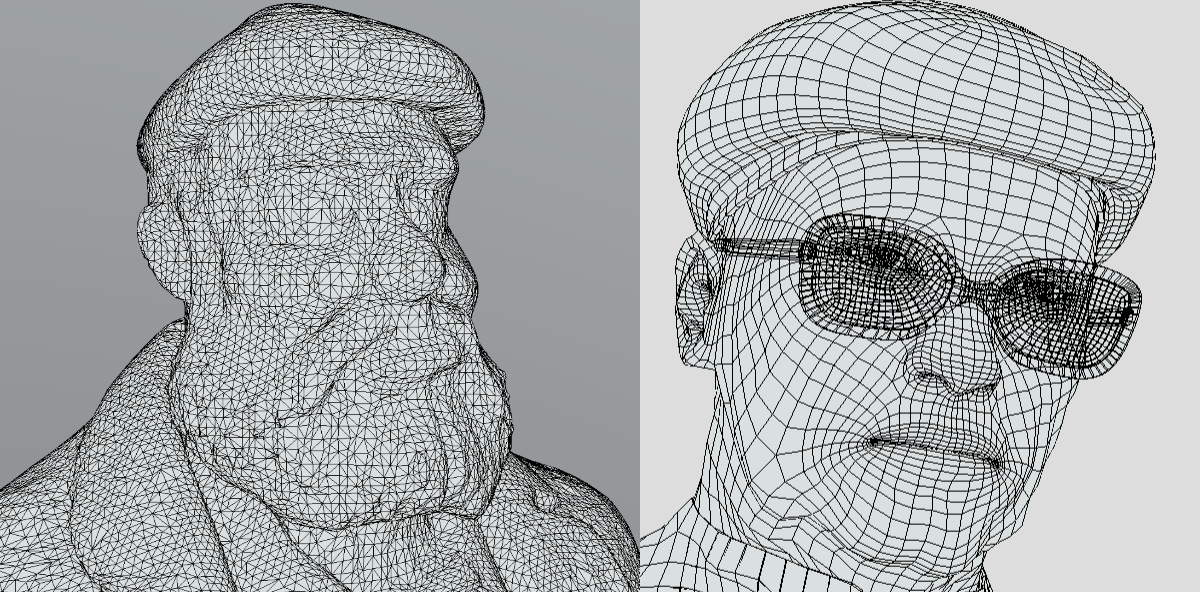
Left: Chaotic topology with small, scattered triangles1. Right: Clean topology with edges that follow the shape of the face and form loops around the eyes and mouth2.
What to aim for: Edge flow that follows the shape of the avatar, with edge loops around the eyes, mouth, and joints. Spend polygons where they matter most. Keep parts that need to move independently, such as eyes, separate from the surrounding mesh instead of painting them onto it.
Textures & UV layout
Your avatar's UV layout determines how its 2D textures wrap around the 3D model.
VRChat can run out of memory if players are in crowded instances and in close proximity to many avatars. Choose a sensible UV layout to reduce the number and size of textures. See Watch your VRAM usage! to learn more about texture memory.
Auto-unwrapping your avatar's UVs can lead to inefficient results. Verify your UV map before uploading. This is especially important if your avatar requires a large number of textures or materials, for example, when you use physically-based rendering.
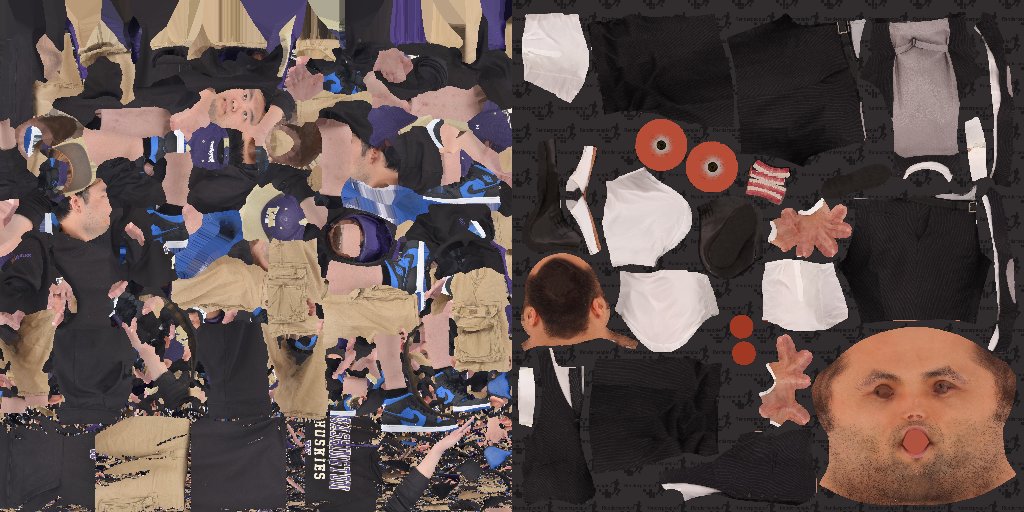
Left: Auto-unwrapped texture, split into many small, scattered fragments3. Right: Texture with a clean UV layout that groups the mesh's parts into a few large pieces4.
Your UV layout also affects how your textures look. Poorly placed seams and stretched UVs cause visible distortion. Other common texture errors include colors bleeding across seams or onto neighboring parts, smeared or blurry details, and areas like teeth, eyes, or the inside of the mouth that look wrong when viewed up close.
What to aim for: Textures without visible errors at a normal viewing distance. Place seams where they're hard to see, and spend texture resolution on the parts users look at most.
Consistent fidelity
Aim for a somewhat consistent level of fidelity across your avatar. Users may feel disappointed if your avatar's fidelity drops or rises sharply when viewed from certain angles or when using certain customization options.
Some avatars look great from the front, but lose most of their detail when viewed from the side, from behind, or in places like the underarms and the soles of the feet. In VRChat, other users see your avatar from every angle.
The same applies to your avatar's thumbnail and any images you use to present it. If they look better than the avatar does in VRChat, or show accessories and features it doesn't include, users will feel misled.
Consider choosing a minimum fidelity you're capable of maintaining across the entire avatar. Not every avatar needs the same level of fidelity, and not every aspect of your avatar needs to be fully fleshed out. However, VR allows users to look at avatars closely, so you may want to prioritize your avatar's hands and face, as described in the next section.
What to aim for: An avatar that looks good from every angle, and looks the way its thumbnail and images suggest. Stylized, simple, and low-poly avatars are welcome - consistency matters more than detail.
Hand & face fidelity
Users look at your avatar's hands and face more closely than other parts. VR users see their own hands and fingers in first-person view all the time, and other users look at their face when talking to them. To a VR user, low-fidelity hands can be reason enough not to use an avatar.
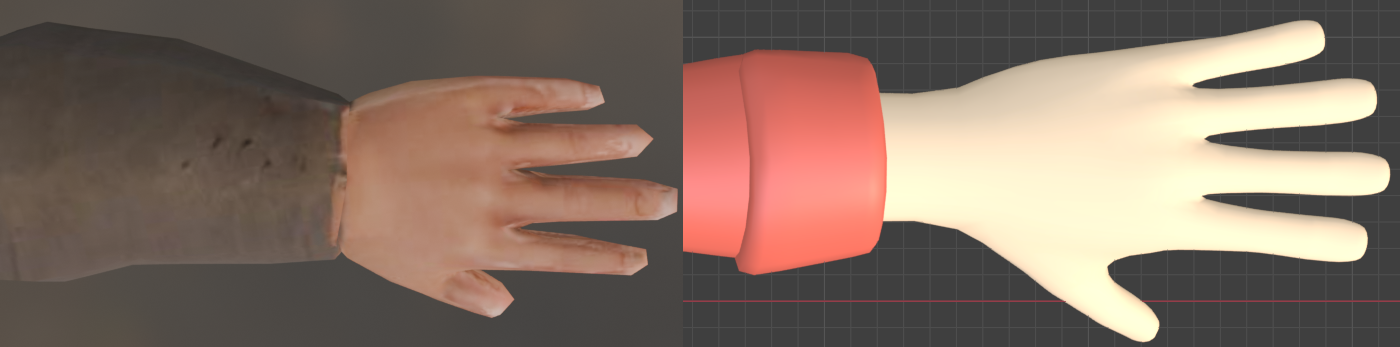
Left: Low-fidelity hand with flat, angular fingers and a texture that blends into the sleeve5. Right: Hand with smooth, clearly defined fingers and clean textures6.
To keep your avatar optimized, it's sometimes worth sacrificing the fidelity of other parts if it allows you to enhance your avatar's hands and face.
What to aim for: Hands with clearly defined, individually posable fingers that look right from a first-person view. A face that still looks good at conversation distance.
Proportions & view position
Your avatar's proportions and view position affect how comfortable it is to wear, especially in VR.
Extremely exaggerated limb proportions can prevent users from fully extending their arms or moving naturally. A poorly placed view position can make it uncomfortable to look around. Unusual proportions are often a deliberate part of an avatar's design, but test them in VR before uploading.
Placing the view position at your avatar's eyes usually works best. However, if your avatar has a very large or forward-leaning head, the entire avatar might tilt when the user tilts their head. You can avoid this by moving the view position closer to the neck, but users then no longer see VRChat from their avatar's eyes. No solution is perfect, so test which position feels best.
VRChat doesn't require avatars to use a humanoid rig, and non-humanoid avatars can be very appealing. However, a humanoid rig usually gives you and your users the most flexibility. With enough testing and creativity, even avatars with unusual body shapes can use one.
What to aim for: Users can look around and fully extend their arms comfortably. Test your avatar in VRChat before uploading, ideally in VR.
Limb & finger deformation
VR allows users to move their avatar's limbs and fingers freely. In a neutral or upright pose, most avatars look fine - but in other poses, they may deform in ways that don't look natural.
Common examples include fingers, elbows, knees, or shoulders that collapse or pinch when they bend, a head that looks detached from the neck, and stray vertices that stretch away from the body when the avatar moves.
Weight painting determines how much each bone moves the mesh around it. Auto-rigging tools are a good starting point and are sometimes sufficient. To achieve better results, make manual weight painting adjustments and test the results. Complex avatar parts often benefit from manual weight painting. See Rig Requirements for details on how VRChat expects your avatar to be rigged.
What to aim for: Your avatar keeps its shape when users make a fist, raise their arms, crouch, or sit down. Test these poses in VRChat before uploading, ideally in VR.
Clipping
Clipping occurs when one part of your avatar passes through another - for example, when skin shows through clothing. A small amount of clipping in extreme poses is normal. Clipping that's visible in your avatar's default state, or as soon as the user moves or enables a toggle, makes an avatar feel unfinished.
What to aim for: No noticeable clipping in a neutral pose or during ordinary movement, including with your avatar's outfits and toggles enabled. Hide or remove the parts of the body that are covered by clothing.
Secondary motion
Hair, ears, tails, clothing, and accessories usually move with the user in VRChat. When these parts are completely rigid, your avatar can feel stiff and lifeless.
PhysBones are the most common way to add secondary motion. Use them where they have the most impact - a few well-configured PhysBones are more effective than dozens of unnecessary ones.
What to aim for: Parts that would naturally sway or bounce do so, unless your avatar's design calls for them to be rigid.
Visemes & speech reactivity
Nearly all avatars use visemes (mouth shapes that match the sounds of speech) or animator parameters to animate their faces when the user speaks. This improves other users' experience by making it easier to tell who's talking. The absence of speech reactivity can make your avatar feel less alive.
Even avatars without a mouth can react to speech. For example, if your avatar's mouth is covered by a scarf, move it back and forth. If your avatar is a robot without a mouth, make its eyes glow.
What to aim for: If your avatar has a visible mouth, it moves when the user speaks. If it doesn't, something else reacts to speech.
Eye look
Avatars with eyes are usually configured to use VRChat's Eye Look feature. This allows them to automatically gaze at nearby users or use features like eye tracking.
If an avatar has eyes, but those eyes are permanently gazing in a single direction, it feels less alive. The same applies to eyes that never blink.
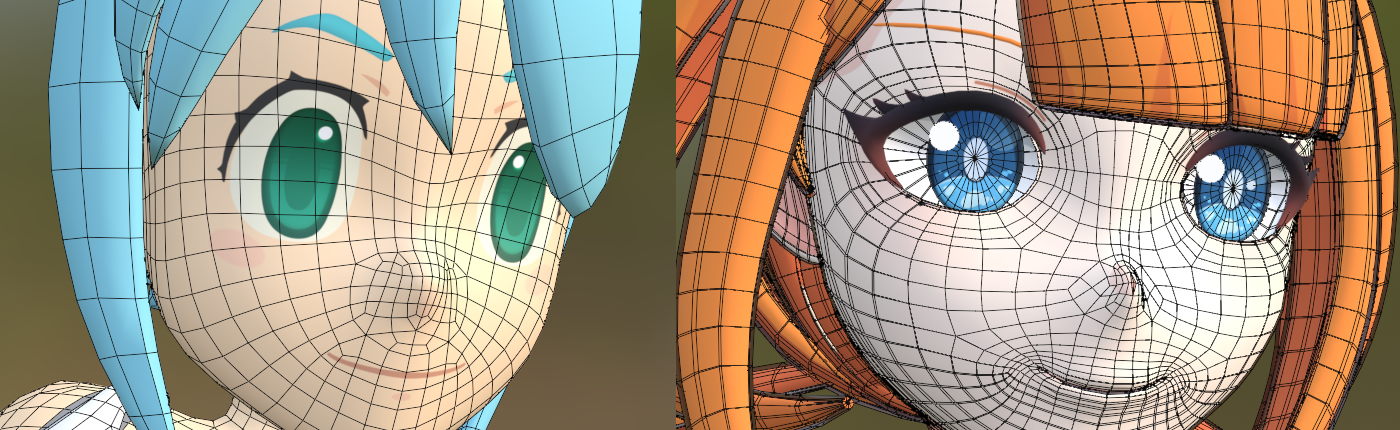
Left: Eyes painted onto the face texture, so they can't move6. Right: Eyes that are separate from the face mesh and rigged to eye bones, so they can look around7.
What to aim for: If your avatar has eyes, they move and blink. Exceptions make sense for some designs, such as masks, visors, or painted-on eyes that are clearly a stylistic choice.
Expressions, toggles & SDK features
The VRChat Avatars SDK allows you to set up customization features for your avatar, such as facial expressions, poses, clothing, item toggles, or color changes. You can also make your avatar more immersive by adding PhysBones and Contacts, or override its default locomotion animations with Playable Layers.
If your avatar doesn't offer a custom expressions menu, it falls back to VRChat's default expressions menu, which contains VRChat's default dance animations. Offering these animations is always a good idea, and is sufficient for novice users who are new to VRChat.
Experienced VRChat users will be disappointed if your avatar doesn't offer an expressions menu or any other SDK features. An avatar's aesthetic is often what catches the user's attention, but SDK features can keep their attention. See Expressions Menu and Controls to learn how to set one up.
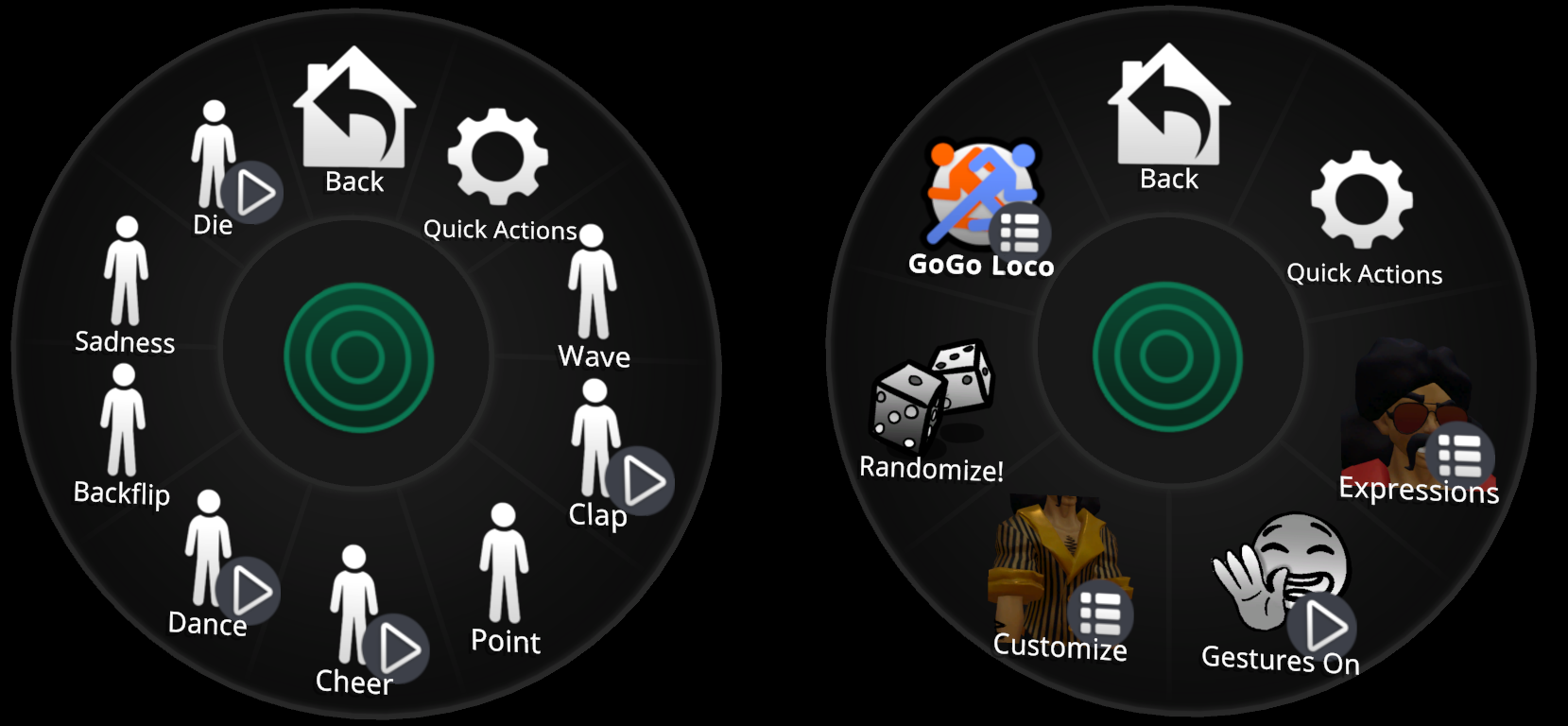
Left: VRChat's default expressions menu. Right: An avatar's custom expressions menu8.
Whatever you offer needs to work. Toggles that do nothing, expressions that break the face, and menu entries with unclear names are more frustrating than not having those features at all.
What to aim for: Every feature in your expressions menu works as intended and has a clear label. Test each toggle and expression in VRChat, alone and in combination, before uploading.
Performance
An avatar that looks great but performs poorly affects everyone around its wearer. Many users hide avatars with a low performance rank, which means they never see your avatar at all.
Optimizing in the wrong places causes its own problems. Decimating your whole avatar to reach a better performance rank is a common mistake: a good rank is valuable, but not if it leaves your avatar's hands, face, or silhouette visibly broken. See Performance Ranks and Avatar Optimization Tips for details.
What to aim for: The best performance rank you can reach without sacrificing the parts users look at most.
If you submit an avatar product to the VRChat Avatar Marketplace, we consider the areas above when reviewing your avatar's visual and technical fidelity.
Please ensure that your avatar complies with the Creator Economy's Content Guidelines. A high-quality avatar may be rejected if it does not also adhere to these guidelines.
Footnotes
-
Screenshot of "Old Man Character Concept [MESHY]" by Ethan Cox, licensed under Creative Commons Attribution. ↩
-
Wireframe render of "OldMan Ernest" by grs, modified from the original, licensed under CC BY-SA 4.0. The combined image is itself licensed under CC BY-SA 4.0. ↩
-
Texture of "A-Pose - Male Full Body 3D Scan" by OverseerThuror, licensed under Creative Commons Attribution. ↩
-
Texture of "Eric Rigged 001 - Rigged 3D Business Man" by Renderpeople, licensed under Creative Commons Attribution. ↩
-
Screenshot of "Young Medieval Boy [MESHY]" by Ethan Cox, licensed under Creative Commons Attribution. ↩
-
Screenshot of "Rigged Anime Girl [Outfits + Facial Expressions]" by murilo.kleine, licensed under Creative Commons Attribution. ↩ ↩2
-
Screenshot of "Blender Chan!!" by SearKitchen, licensed under Creative Commons Attribution. ↩
-
Expressions menu of "Funkmaster Jman" by Raujinn. ↩